
Recently I had to create a lot of Microsoft Office Word documents based on the same template, so I decided to use Mail Merge. Unfortunately when you generate a document from a defined Mail Merge template in Word, you end up having all the pages inside one huge document. But I wanted to have each form in a seperate word document.
To achieve this non-standard behavior, I wrote a little helper: execute the following VBA Macro on your Office Word Mail Merge template to have Word generate & save every record into a single file.
Attention
- Unfortunately this Macro does not work with Microsoft Office 2010+ on Windows! (Reason is the next point #2)
- There is one thing to do manually, because I couldn’t solve it programmatically: you have to manually set the “Mail Merge Output” setting to “Current Record”! (default is “All”)
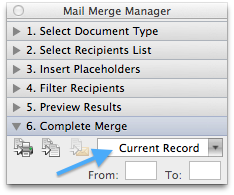
Here’s the VBA code for the Macro:
Alternative approach
An alternative approach is to split the generated mail merge document based on the section breaks that Word inserts when executing mail merging. For me this was not working because of special formatting and tables inside the tempalte document.

@Nino: you missed one IMPORTANT thing 🙂 See in my article what I wrote under “Attention”:
If you don’t change this setting manually, it will copy all the mail merge letters into each of the documents – just as you described your problem! Hope it helps 🙂
Kindly clarify in step by step how to (manually set the “Mail Merge Output” setting to “Current Record”)?
@tarek: in Office for Microsoft Windows, you can find the settings as shown in this screenshot:
1) In the Mail Merge Ribbon, click on “Finish & Merge”
2) Click on “Edit individual Documents…”
3) Choose the “Current Record” radiobutton and confirm with OK
Thank you for the instant reply. I really appreciate it. Yet I have done what you’ve just suggested and after that the code, when runs, is saving seperate files that are all equally the same (copies of the same record). Any help please?
Hi again, please I just want to know the step by step how to insert the code and how to run the code, because if we have to do it manually then what is the use of the code?
@tarek:
In order to use a Macro, you first have to enable the “Developer” Ribbon vai the Word Options:
Add a new Macro (Name can be anything):
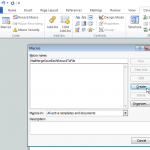
Copy-paste the Macro-Code and Save:
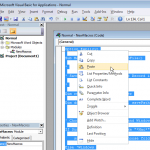
Now you can run the Macro:
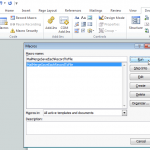
Ok I tested it again with Microsoft Word 2012 on WINDOWS and I have to admit unfortunately, that the Macro-Code does NOT work with that Version of MS Word 🙁
I would need to investigate further – but the problem is definitely, that the “lastRecord” is not being calculated correctly, according to the Datasource (list of addresses, or similiar) used for Mail Merge.
SORRY
First let me give credit where credit is due because I know absolutely nothing of writing macros. In fact this is my first attempt at using a macro let alone modifying the code. Armed only with 24 year old knowledge of Basic (yes the original, not Visual Basic) and Fortran (no not the punch card Fortan but really close) I took Mr. Raduner macro above, Remou macro code for producing pdf’s at the following link https://stackoverflow.com/questions/14643524/losing-format-with-ms-word-mailmerge-macro, and a few others and combined different aspects and PRESTO!!! I clearly got very lucky but it works in MS Word 2010. Hope it works for everyone else as well. I’m loading both individual pdf creator and individual word file creator. I hope Mr. Raduner will work his magic, clean this up and make it more user friendly for everyone else as he clearly knows way more than I do.
INDIVIDUAL WORD FILE MACRO (note you must have a “FileName” Column in your Excel data source):
INDIVIDUAL PDF FILE MARCO: (note you must have a “FileName” Column in your Excel data source):
Awesome! Thank you, Raymond, for sharing the code! And I am happy that you got it working.
I typically discount solutions that are this dated, as things often change but, after spending countless hours researching & testing code to solve this problem using Windows/Office 365 (Word 2016). Oliver’s code looked more promising than anything I had tried yet. It didn’t quite get me what I needed and I even went so far as to try running it on my kids Mac.
I ended up running Spanky Raymond’s code back on my laptop and it worked ever so BRILLIANTLY!!!! I’m commenting so that others that have dug themselves into a deep mail merge hole, as I had, can find some light.
Thank you both (hoping against hope that you are still around to find my praise) for sharing your skills / solutions with us!
Hi Laura & thanks for your positive feedback 😊
In recent years I reused this macro as well and found it kept working and doing it’s job… therefore of course letting this online for anyone facing the same challenge.
And yes, still here accepting and reading comments 😉
Oliver
Have word 2007. When I run the VBA code for the Macro (MailMergeSaveEachRecordToFile()), Word generate single files with document name as I choose. But inside each of them are all the pages and not just one form.
So I have like 50 equal documents with different file names.
This happens with “Mail Merge Output” setting to “All”.
If I set the “Mail Merge Output” setting to “Current Record”, I’ve got just one new document with one form in it.
Am I doing something wrong?
Luka,
Have you tried generating the Mail Merge without the Macro and verify the output? It might be, that you missing the “Next record” field in the bottom of your template.
Regards,
Oli
I’ve just used your original code in Word2010, and many thanks for putting it together. I looked for quite a while for something clear and simple. While my last programming was in Basic (before QuickBasic even), I did manage a simple improvement which seems to avoid the whole “current record” issue. You can leave it set to “All”.
All of my individual documents appeared the same when opened, which forced me to try this:
The
DataSource.FirstRecordandlastRecordpointers (probably the wrong term) are all that I put in there, and now the rec variable insures that I get the right record. Works great now. The only other change I made was to hard-code the filepath since I wasn’t getting any kind of prompt. Anyway, maybe someone else can profit by this.Oliver,
In other words, I used the code you show at the top as-is, with only the addition of two lines. I’m running W7, Word 2010.
Original:
Modified:
I don’t think the problem you mention at the top is a problem anymore. Can you verify?
Greg
This Part
is not working for word for mac…does anybody know why?
Thanks
Hey tried the code you posted on December 6 for single PDF files. I cannot run it as it gives me an error in this part
I am using Windows for mac. Anyone an Idea? I am helpful for every hint.
Cheers
Giovanni
Thanks, this post was very helpful. In my case i had to customise the macro script a little in order to save the documents as PDF’s instead.
I changed two sections in the script as below:
First replace both appearances of .docx with .pdf so the exported files have the correct file name extension:
Then add the bit that let’s Word know to export as a PDF:
I just wanted to say thank you to Oliver for your original post and Greg for his fix from Feb 2014 – you just saved me a ton of time!
First I would like to say Thanks to Greg and Oliver for making the script and for fixing it for windows.
While running the macro I noticed if there was 2 of the same fields it replaces it instead of making another.
For example I want to save the file according to the Name
If the Name data field have 2 John when it creates the second John it will overwrite the first one and I am left with only 1 John.docx
So what I did to get around this and create a new entry would be:
This way it checks if file is present in dir, if so add i into filename
Cheers
-Harold
Hi,
What do I change in the macro to save the file name using fields within the form?
I read that I could either stipulate that using:
1. the actual merge field within the document: <> and <>
OR
2. the line on which the text sits on: so if my <> and <> field sits on the 3rd line of the document.
Hi jc
To use a field for the file name, change line 31 from the macro code to something like this:
docNameField = ActiveDocument.MailMerge.DataSource.DataFields("Field Name").ValueHope this helps!
Oliver
I tried this macro and it works. Just to confirm, you have to manually run each document (record)?
I have a few hundred mail merge documents to do. Can you modify your app, or do you know if an app for mac exists that would allow you to name each record (created document) based on a field in the excel file?
Hi Gretchen
I do not understand your first question completely – what the macro does is exactly writing each mail merge record into 1 single document.
I may answer the second question however. You can easily use each record’s values coming from the excel file, to use in the file name. Change line 31 to something like this:
docNameField = ActiveDocument.MailMerge.DataSource.DataFields("ExcelFile ColumnName").ValueHope this helps!
Oliver
I would just use merge tools instead. Check out https://mergeguru.com/ which is free. It can create your files automatically for you and even name them automatically.